Updated Oct 2026
A CleanMyMac alternative for when your space is in Messages
Is CleanMyMac safe?
Yes, from a malware point of view, when you download the official build. MacPaw says CleanMyMac is notarized by Apple (MacPaw). Notarization means Apple scanned the submitted build for known malicious software. It is a malware check of that build. It is separate from whether each cleanup rule is right for your files (Mole, Shiny).
You can check your own copy in Terminal:
spctl --assess --verbose /Applications/CleanMyMac.appA notarized app reports “accepted” and “source=Notarized Developer ID” (Shiny). Adjust the path if your copy has a different name.
MacPaw’s own support page says CleanMyMac asks for Full Disk Access so it can scan for junk and malware (MacPaw). Super Duper Space asks for the same permission so it can read the Messages folder. Download either app only from its official source, keep a backup, and look at what’s selected before you delete.
What a Mac cleaner does
MacPaw describes CleanMyMac as one app for junk cleanup, malware scanning, uninstalling, duplicates and similar photos, and large or forgotten files (MacPaw). On their safety page they also say you can review the list before anything is deleted, and that personal files are left alone unless you use a tool such as Space Lens or My Clutter to pick them yourself (MacPaw).
Caches grow back, and on many Macs they are not the big number. When Storage shows tens of gigabytes under Messages, the space is in photos and videos people sent you. That needs decisions about specific files.
Compare the options
Facts checked Oct 9, 2026.
| Topic | Apple’s Storage settings | CleanMyMac | Super Duper Space |
|---|---|---|---|
| Cost | Free, built in | $39.95 a year, or $119.95 one-time, for 1 Mac on MacPaw’s store page, checked Oct 9, 2026. Other plans (2 Macs, 5 Macs, and monthly) are on that page. | Free to join the private beta. No price is set yet. |
| Main job | See storage by category, and delete large files and attachments from the lists macOS shows | Junk cleanup, uninstalling, malware scan, duplicates, and large files, on MacPaw’s product page | Messages attachments, plus a by-app list of files the scan could measure |
| Messages attachments | One list you can sort by size | MacPaw’s Messages articles describe Apple’s Storage list and a general Cleanup scan. See their current feature list for a dedicated Messages review. | Grouped: biggest videos, already in Photos, older than 2 years, exact duplicates |
| Photos matches | The Storage list is one attachment list. It does not show a Photos-library match next to each file. | MacPaw lists duplicates and similar photos on the product page. | Yes for Messages files: exact copies and files that look the same, compared with the Photos library on this Mac |
| Undo after deleting | Recently Deleted, up to 30 days, in the Messages app | MacPaw says you can review the scan before cleaning. See their docs for what happens after a delete. | Holding area (the app calls it Ready to delete), with put-back until you delete for good. Files there still use disk space. |
| Full Disk Access | The Storage pane is part of macOS | MacPaw says CleanMyMac asks for it (support page) | Needed to read Messages |
| Account needed | No extra account for Storage. iCloud features use your Apple Account. | Sold on the MacPaw Store, the Mac App Store, and Setapp | None |
| Where it runs | On your Mac | On your Mac. MacPaw says the app also collects limited diagnostic data. | Scan and Messages cleanup stay on your Mac. No account. |
When CleanMyMac is the better choice
- You want one app that also uninstalls apps and scans for malware.
- Your big numbers are caches, app leftovers, or general clutter.
- You already have it through Setapp.
When Super Duper Space fits better
- Storage shows Messages near the top. On one example Mac in October 2026, Messages held 31.78 GB, with 16.21 GB of that in videos.
- You want to keep the copies on your iPhone. The app tells you deleting removes local copies and your other devices keep theirs, and that Messages in iCloud may download a file again. We’re still testing this with Messages in iCloud turned on. Check the setting first. Here’s why.
- You want to review each file yourself, with a way to put it back before it’s gone for good.
- You don’t want an account for the app.
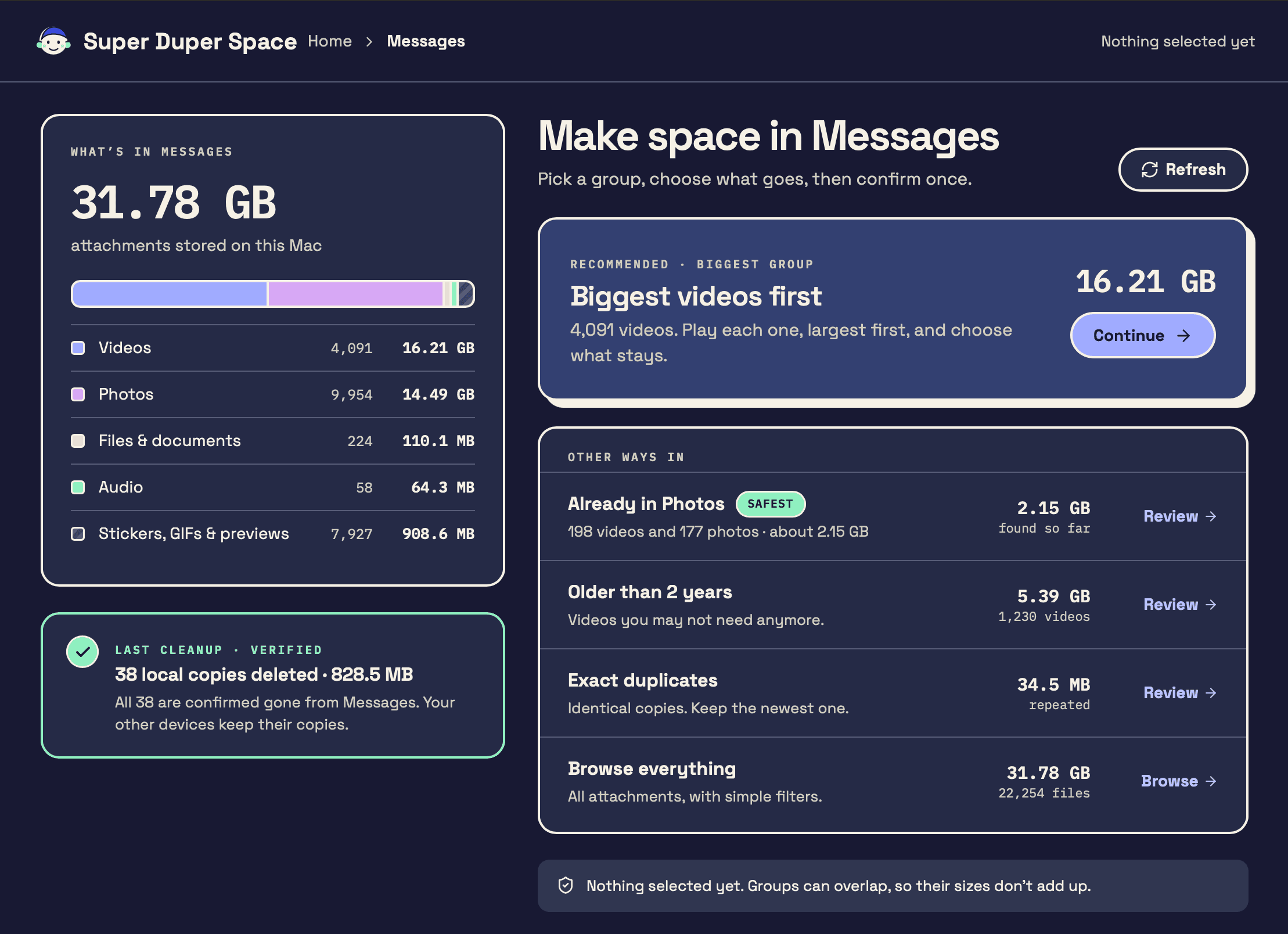
Limits: it does not uninstall apps or scan for malware. It can remove some developer caches you confirm, such as npm, pnpm, and Homebrew, plus leftover app-updater folders. It is in private beta for macOS 14 or later.
Other free options worth knowing
- Apple’s Storage settings (System Settings > General > Storage) for a first look and Messages attachments.
- OnyX for maintenance and cache cleanup, free.
- AppCleaner for removing apps and their leftovers, free.
- DaisyDisk or GrandPerspective to see what’s big on the whole disk.
Related: Messages storage, System Data, FAQ.
FAQ
Is CleanMyMac legit?
Yes. It’s a commercial app from MacPaw, notarized by Apple, and sold on the Mac App Store and Setapp as well as MacPaw’s site.
Is CleanMyMac a virus or malware?
No. MacPaw says the official build is notarized, which means Apple scanned it for known malware. Fake copies from unofficial download sites are the risk, so get it from MacPaw, the App Store, or Setapp.
Is CleanMyMac worth it?
It depends on what fills your disk. MacPaw’s product page lists junk cleanup, malware scanning, uninstalling, duplicates, and large files. If Storage shows Messages as the big category, start with Apple’s Messages list or a Messages review. A general cleaner is a different job.
What is a free alternative to CleanMyMac?
Apple’s built-in Storage settings cover the basics. OnyX and AppCleaner are free for maintenance and app removal. Super Duper Space is free to join during its private beta. A later price is not set.
Does Super Duper Space replace CleanMyMac?
It covers a different job. It reviews Messages attachments and explains measured storage by app. It can also remove some developer leftovers, unzipped downloads, and personal-file copies you confirm. It does not uninstall apps or scan for malware.
Does CleanMyMac clean Messages attachments?
MacPaw’s product page lists junk cleanup, large and forgotten files, duplicates, and similar photos. Their Messages articles also walk through Apple’s Storage settings and a general Cleanup scan. Their Mail Attachments module is for email apps such as Mail, Outlook, and Spark. Check MacPaw’s current feature list if you are buying it for Messages photos and videos.